
TradingView is the default charting app for a reason
TradingView earned its default status: fast charts, a huge indicator library, drawings that actually stay put, Pine scripts, and a social layer where ideas travel. If your bottleneck is markup, alerts, or sharing a setup, it is still the product to beat in 2026.
That does not make it a research terminal. Stock research is a loop — ticker → business → financials → filings → ownership → options → a written decision. Charts sit inside that loop. They are not the loop.
This guide ranks TradingView alternatives for equity research, not charting clones. The question is whether you can get off the drawing board without opening five consumer tabs. For a chart-UX comparison, see best stock charting software. For desk-wide terminal replacements, see Bloomberg Terminal alternatives.
How we ranked TradingView alternatives
- Chart quality: candles, volume, multi-timeframe, enough indicators to time an entry
- Research adjacency: DES / profile, financials, filings, ownership, options
- Screener handoff: can a shortlist become a researched thesis in the same workspace?
- Portfolio and watchlists so ideas do not die in a screenshot folder
- Pricing for individuals and small teams — not institutional desk contracts
- Time-to-value: one session, one ticker, a written yes/no
Quick comparison table
| Platform | Charting | Filings | Ownership | Options | Research loop | Best for |
|---|---|---|---|---|---|---|
| Vest Terminal | Strong | Yes | Yes | Yes | Native | Charts + equity research |
| TradingView | Excellent | Limited | Limited | Limited | Chart-first | Drawings & social ideas |
| TrendSpider | Excellent | No | No | Limited | Automation | Pattern detection |
| Thinkorswim | Excellent | Limited | Limited | Yes | Broker-native | Active traders |
| Koyfin | Strong | Limited | Limited | Limited | Dashboards | Advisor visuals |
| TIKR | Basic | Yes | Limited | No | Models | Fundamentals depth |
| Bloomberg | Excellent | Yes | Yes | Yes | Full desk | Institutional teams |
| Yahoo / StockCharts | Basic–strong | Basic | Basic | Basic | Light | Casual charts |
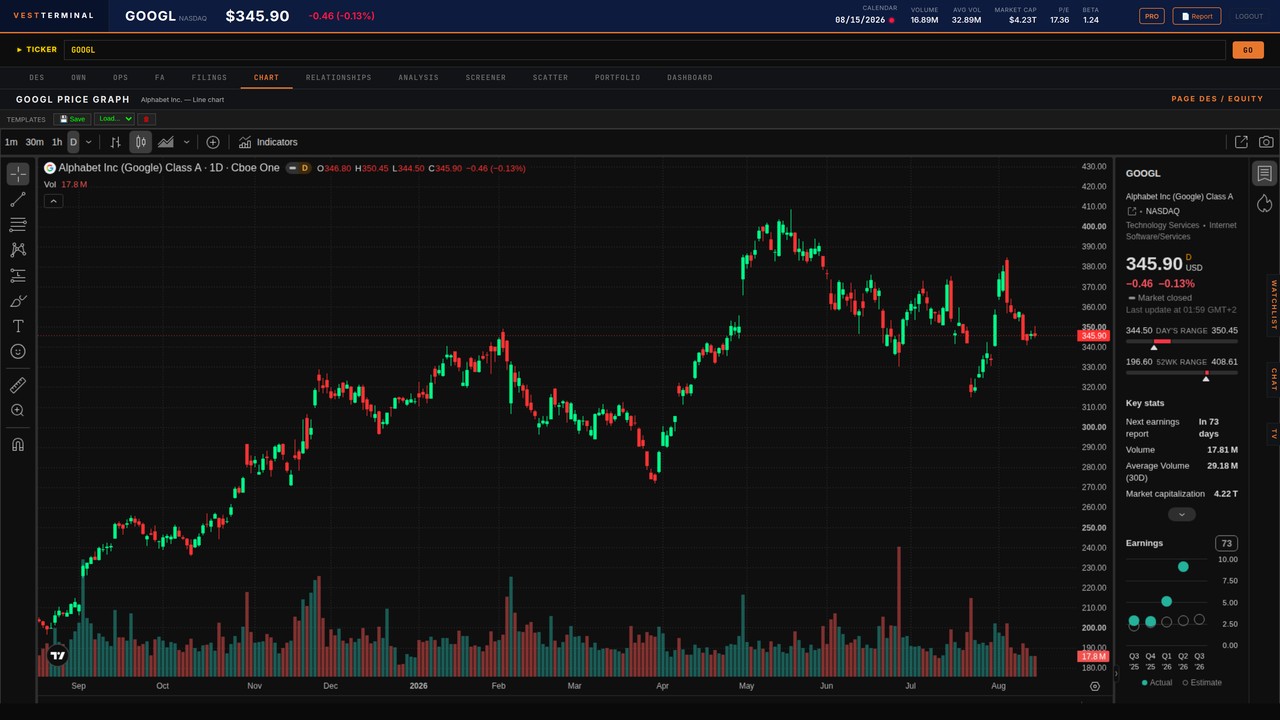
Open a ticker chart beside filings and fundamentals — try Vest Terminal free.
Start Free1. Vest Terminal — best TradingView alternative when research has to sit next to the chart
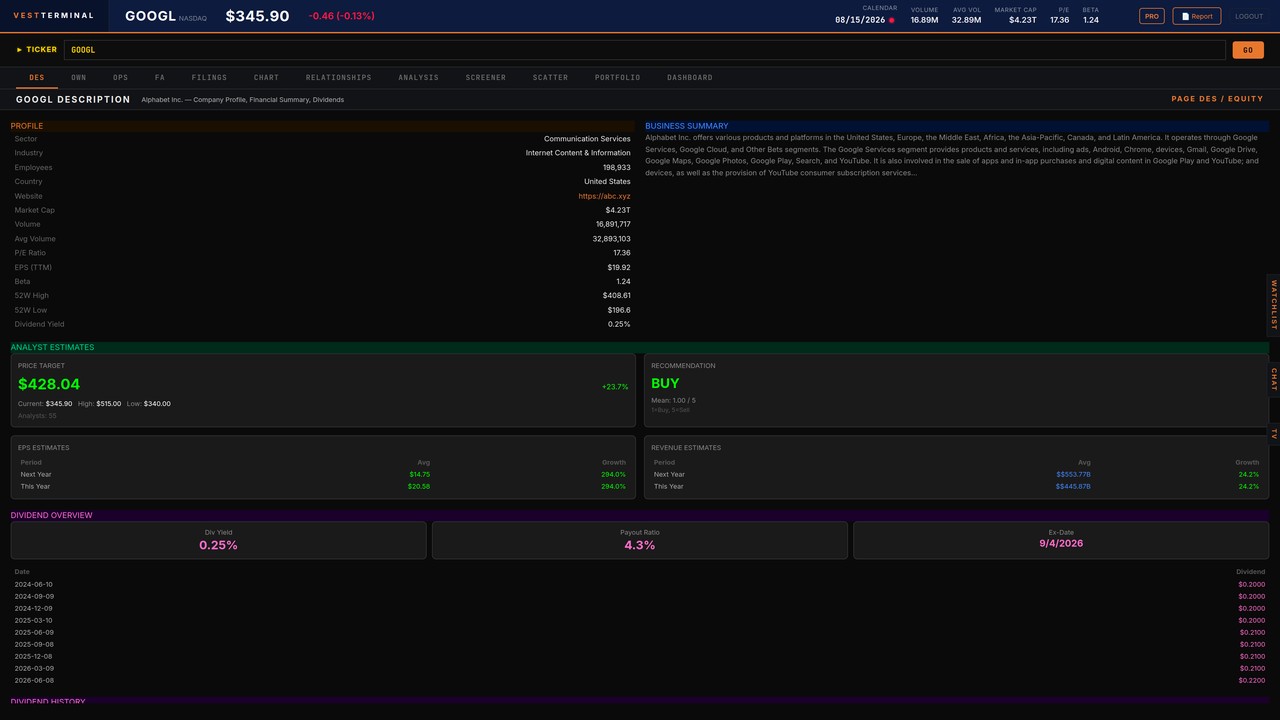
Vest Terminal is a web equity research terminal: company description, ownership, options, financials, SEC filings, charts, supplier/customer relationships, advanced analysis (short interest, insider, 13F, COT, Congress), screener, scatter, portfolio, and dashboard — in one workspace.
The chart module is not trying to out-draw TradingView. It is trying to kill the failure mode TradingView users know too well: a perfect markup with no path into the 10-K, the holder list, or the options tape. You time the entry on the candle, then open DES, FA, filings, and ownership on the same name without losing the thread.
That adjacency is the product. Pair it with Vest’s Learn hub when a multiple needs a definition, and with the how to screen stocks walkthrough when the idea started as a filter rather than a drawing.
- Strengths: research-native loop, filings and ownership beside charts, stock/ETF screener, freemium entry, team features on higher plans
- Trade-offs: drawing tools and social idea feed are not TradingView-class; Pine-style scripting is not the point
- Best if: you want one research cockpit instead of TradingView + EDGAR + a screener + a fundamentals tab
2. Stay on TradingView — when charting really is the job
Do not switch if your edge is markup, multi-layout watching, custom scripts, or publishing ideas. TradingView still leads that job. The honest alternative is often a pair: keep TradingView for drawings and alerts, run the thesis in a research terminal.
Switch — or add a second workspace — when you notice the same failure every week: the chart is done, and you still have not read cash flow, leverage, or who is selling. That is not a drawing-tool problem.
3. TrendSpider — best for automated technicals
TrendSpider automates trendlines, Fibonacci, and multi-timeframe confluence. If your bottleneck is scanning patterns across a universe, it is a serious TradingView alternative on the technical side.
It does not become a filings or ownership workspace. Use it when detection is the job; use Vest when the detected name still has to survive a research checklist.
4. Thinkorswim — best broker-native TradingView alternative
Charles Schwab’s thinkorswim platform remains a heavyweight for active traders: options analytics, thinkScript, and execution in the same desktop. If you already trade there, replacing TradingView with thinkorswim can collapse charting and orders.
It is a poor fit as a lightweight web research terminal. Filings, ownership maps, and a calm fundamental workflow are not why people open thinkorswim. Choose it for trading ops; choose Vest for research ops.
5. Koyfin — dashboards and advisor storytelling
Koyfin is strong at market dashboards, graphing fundamentals, and advisor-facing visuals. Charts are capable; the product story is reporting and multi-asset layout, not a Bloomberg-style equity cockpit.
If client PDFs are the deliverable, Koyfin may beat both TradingView and Vest. If the deliverable is a researched single-name thesis with filings and options next to the chart, see our Koyfin alternative for stock research.
6. TIKR — fundamentals and historical models
TIKR is the alternative when you barely needed TradingView in the first place. Financial statements, estimates, and model history are the point; charting is secondary.
Use TIKR when modeling depth is the bottleneck. Use Vest when the bottleneck is stitching models, filings, ownership, options, and a chart into one session.
7. Bloomberg — institutional charts inside a full desk
Bloomberg’s charting is excellent and sits inside the widest research OS in markets. It is the wrong comparison for most individual investors on price, not on capability.
If you are leaving a Bloomberg seat — or never planned to buy one — the practical path is a web terminal that covers the equity loop. That comparison lives in 10 Best Bloomberg Terminal Alternatives in 2026.
8. Yahoo Finance and StockCharts — light and classic
Yahoo remains useful for a quick quote and a basic chart. StockCharts.com still serves classic technical analysis with a cleaner, older toolkit. Neither replaces TradingView’s modern drawing UX, and neither is a research terminal.
Use them as a free look. Graduate when your process needs saved screens, filings, and a thesis you can reopen next quarter.
Worked example: a GOOGL markup that still needs a thesis
Suppose you marked up GOOGL on TradingView: weekly trend intact, a pullback to a moving average, volume drying up. That is a timing note. It is not yet a position.
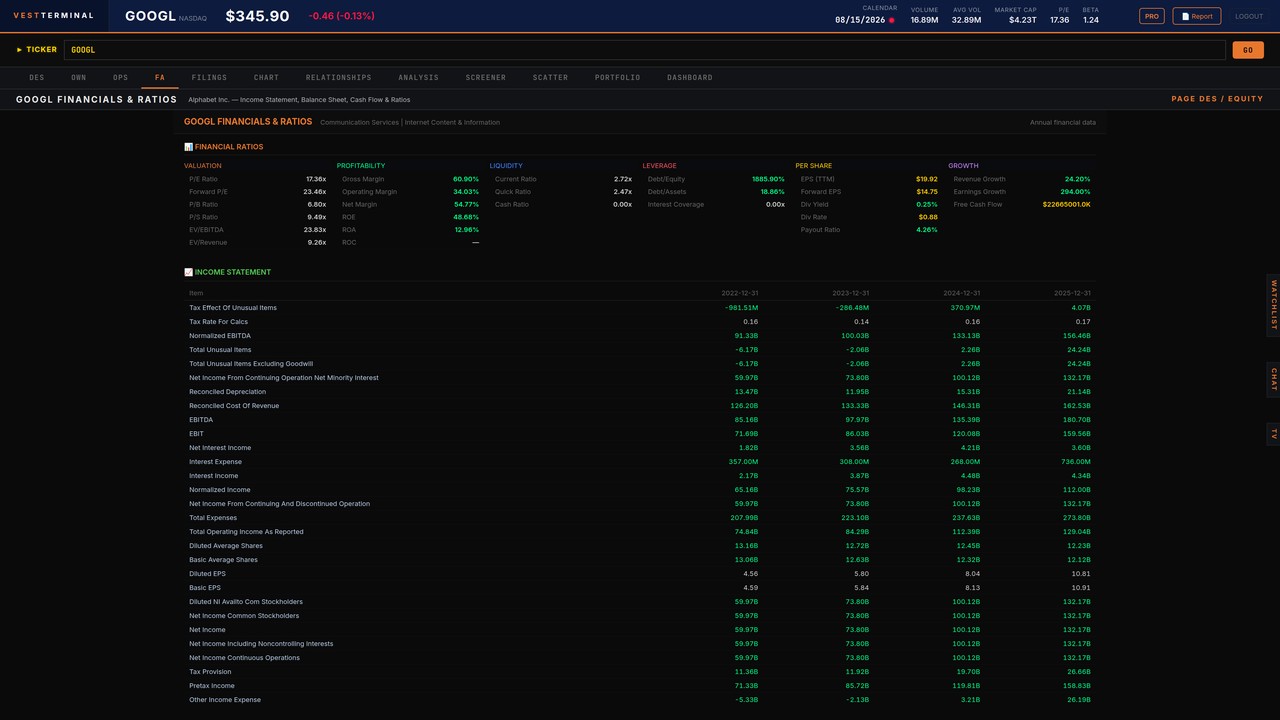
The research pass asks different questions. What does Alphabet sell, and which line is actually growing? Are margins and free cash flow supporting the multiple, or is the chart discounting a narrative the financials do not? Who owns the stock, and did insiders just cluster sells? Is there a filing or 8-K that the drawing never saw?
In Vest Terminal that pass is one workspace: DES for the business, FA for multi-year numbers and multiples (including P/E and EV/EBITDA), filings for surprises, ownership for incentive context, then the chart for timing. If cash flows are forecastable, sanity-check with a simple DCF range instead of a single target. Write three bullets. Only then does the TradingView alert deserve size.
Who should not leave TradingView
- Traders whose edge is intra-day structure, custom Pine, or publishing ideas
- Users who already have a separate, disciplined research file and only needed better drawings
- Anyone hoping a new charting UI will fix an unwritten process — it will not
Who should add or switch: individual investors and small teams who finish charts and then stall; people stitching Yahoo + EDGAR + a screener every session; anyone who wants the candle and the 10-K in the same product. Vest is priced for that operator, not for a sell-side desk.
A 15-minute test before you switch
- Pick one familiar large cap (GOOGL or AAPL) you already marked up in TradingView
- In the candidate product, open the same ticker’s chart, then jump to profile, financials, and filings without a new login
- Check ownership or insider context — if it takes a third website, the loop is still broken
- Run one saved screen and open a survivor in the same workspace
- Write a three-bullet thesis. If you cannot, the tool failed the job — not the ticker
That test is more honest than a feature matrix. TradingView will usually win the first minute of drawing. Vest Terminal is built to win minutes two through twenty, when the candle has to become a decision. Open GOOGL in DES, then the chart, then filings — one sitting.
How to use Vest Terminal with TradingView (if you keep both)
A durable split: TradingView owns drawings, multi-layout watching, and alerts. Vest Terminal owns the research file — DES, FA, filings, ownership, options, screener, portfolio. Do not duplicate watchlists forever; pick one system of record for names you might actually buy.
When a TradingView alert fires, the next click should be the same ticker in Vest, not another headline tab. If that handoff feels heavier than the alert, your stack is still too fragmented.
Run the 15-minute test in Vest Terminal — start free.
Start Free